

SewWhat-Pro Sew What Pro – Embroidery Editor
Original price was: $65.00.$29.00Current price is: $29.00.
... people are viewing this right now
Compare
SewWhat Pro software with Lifetime License
Whats is Sew What Pro?
This software is software is for viewing, editing and converting embroidery files from various different sewing manufacturers. It includes integrated project management tools described below under the Features tab; several ways to import and arrange pre-digitized lettering; and dedicated tools that make it easy to add borders and nap-tack stitches to existing patterns.
Key Features of SewWhat-Pro:
- View embroidery files, even if they are included in zip or rar archives
- View thumbnails (in Album View) of files in your working directory
- Write Designer-1© floppy disks and USB drives
- Use TrueType fonts [TTF©] to create monogram lettering (with varying degrees of quality)
- Resize, reposition, delete, rotate, and merge sewing patterns
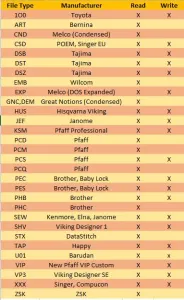
- Convert from, and save to, various file formats (see chart below) either individually or in batch mode
- Simulate the real-time stitch out of a pattern
- Change individual thread colors and background fabrics
- Print out the design and design summary
- View (or hide) a stitch histogram of the thread length distribution for each pattern
- Hide or view (as thickened or dashed lines) jump stitches
- ICON toolbar button to toggle between thread pane information and alphabet mode for easy entering of pre-digitized lettering
- Applique cutter tool for creating SVG and JPG files for outline of applique, used to cut applique fabric in Cameo© and Cricut© software
- Cutting toolbar allows graphical separation of patterns at specific stitches
- Density adjustment dialog to resize a pattern at constant density
- Graphical or text-based reordering of thread color stops is available
- Capability to write Smart Media or Compact Flash cards for Singer, Brother, Janome, and new Bernina machines
- Converts Cross Stitch pattern files to embroidery files using a “plugin” from myriaCross (MC). You may download the DEMO, or purchase the MC plugin for SewWhat-Pro, here. Once the plugin is installed, it becomes seamlessly integrated into the SewWhat-Pro workspace and can be used to preview and convert a variety of different Cross-stitch formats. If the plugin stops working after updating to a newer version of Windows, simply uninstall and reinstall it.
Supports a command-line interface for file conversion which has the form:
Reviews
There are no reviews yet.