
SewArt Pro + SewWhat Pro – Machine Embroidery Editing Craft
SewArt-Pro + SewWhat-Pro softwares with Lifetime Licenses
Valid for 2 computers
Whats is SewArt ?
This software is digitizing for converting raster image files (*.jpg/*.png/*.tif/*.bmp) and vector images (*.svg, *.emf, *.wmf) into embroidery file formats. Image processing tools and a step-by-step wizard are provided to render images that are suitable for yielding high-quality embroidery stitch-outs. Automated pattern fills and a manual satin fill stitch tool are available.
Key Features of SewArt:
- Reads raster or vector format images (supported input formats include *.bmp, *.png, *.jpg, *.gif, *.svg, *.wmf, and *.emf)
- Allows images in other (unsupported) file formats to be pasted into the SewArt workspace
- Converts images to high-quality embroidery files for sewing
- Supports output embroidery file formats including Brother (c) *.pes, Tajima (c) *.dst, Janome (c) *.jef, Melco (c) *.exp, Viking(c) *.hus New Pfaff (c) *.vip, Viking SE (c) *.vp3, and Singer (c) *.xxx (these may be converted by SewWhat-Pro, or other embroidery editors, to a larger variety of embroidery file formats compatible with most home and commercial machines)
- Contains image-processing tools for converting images into color-reduced, smoothed images suitable for digitizing
- Includes a variety of pattern fills which can be applied to sew individual regions of the image
- Supports both auto-digitizing and manual digitizing options to give substantial user control over the digitizing process
Whats is SewWhat-Pro?
This software is software is for viewing, editing and converting embroidery files from various different sewing manufacturers. It includes integrated project management tools described below under the Features tab; several ways to import and arrange pre-digitized lettering; and dedicated tools that make it easy to add borders and nap-tack stitches to existing patterns.
Key Features of SewWhat-Pro:
- View embroidery files, even if they are included in zip or rar archives
- View thumbnails (in Album View) of files in your working directory
- Write Designer-1© floppy disks and USB drives
- Use TrueType fonts [TTF©] to create monogram lettering (with varying degrees of quality)
- Resize, reposition, delete, rotate, and merge sewing patterns
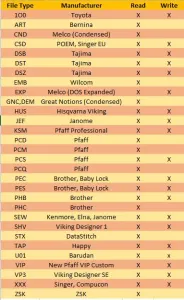
- Convert from, and save to, various file formats (see chart below) either individually or in batch mode
- Simulate the real-time stitch out of a pattern
- Change individual thread colors and background fabrics
- Print out the design and design summary
- View (or hide) a stitch histogram of the thread length distribution for each pattern
- Hide or view (as thickened or dashed lines) jump stitches
- ICON toolbar button to toggle between thread pane information and alphabet mode for easy entering of pre-digitized lettering
- Applique cutter tool for creating SVG and JPG files for outline of applique, used to cut applique fabric in Cameo© and Cricut© software
- Cutting toolbar allows graphical separation of patterns at specific stitches
- Density adjustment dialog to resize a pattern at constant density
- Graphical or text-based reordering of thread color stops is available
- Capability to write Smart Media or Compact Flash cards for Singer, Brother, Janome, and new Bernina machines
- Converts Cross Stitch pattern files to embroidery files using a “plugin” from myriaCross (MC). You may download the DEMO, or purchase the MC plugin for SewWhat-Pro, here. Once the plugin is installed, it becomes seamlessly integrated into the SewWhat-Pro workspace and can be used to preview and convert a variety of different Cross-stitch formats. If the plugin stops working after updating to a newer version of Windows, simply uninstall and reinstall it.
Supports a command-line interface for file conversion which has the form:
Reviews
There are no reviews yet.